Create a Spooky Halloween Ghost Ornament with This 3D Layered SVG Cut File
As the leaves turn and the air gets crisp, it's time to start thinking about your Halloween decorations. One unique and creative way to add some spookiness to your home or office is by crafting a Halloween Ghost Ornament SVG. This 3D layered ghost cut file is perfect for anyone looking to create a special and personalized Halloween ornament.
What is the Halloween Ghost Ornament SVG?
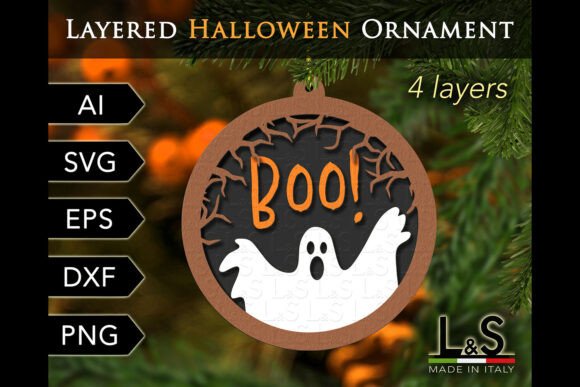
The Halloween Ghost Ornament SVG is a digital cut file designed for use with various cutting machines, including Cricut, Silhouette, laser cutters, and CNC machines. It features a 4-layer design that creates a dimensional and visually appealing ghost ornament. The file is scalable, making it easy to adjust the size to fit your specific needs, whether you want a small tabletop decoration or a larger hanging ornament.
Materials and Compatibility
This versatile cut file can be used with a wide range of materials, allowing you to experiment and find the perfect look for your project. Commonly used materials include:
- Paper
- Plywood
- MDF (Medium-Density Fiberboard)
- Acrylic
- Plexiglas
Each material offers a different texture and finish, so you can choose one that best fits your aesthetic and practical needs. For example, using paper might give a more traditional, crafty feel, while acrylic or plexiglas can provide a sleek, modern look.
File Formats and Accessibility
To ensure compatibility with a variety of cutting machines and software, the Halloween Ghost Ornament SVG comes in multiple file formats:
- 2 AI files - for Adobe Illustrator and other vector software
- 2 SVG files - for most cutting machines such as Cricut, Silhouette, CNC, and laser cutters
- 2 EPS files - for Adobe Illustrator, Inkscape, and other vector software
- 2 DXF files - for Silhouette Studio Basic Edition
- 4 PNG files - transparent background, 300 dpi for printing or cutting machines
All of these files are compressed into a single ZIP file, which you will need to extract before accessing the individual files. This makes it easy to import the files into your preferred software and start creating immediately.
Practical Implementation Tips
Here are some tips to help you integrate the Halloween Ghost Ornament SVG smoothly into your creative process:
- Prepare Your Materials: Gather all the materials you plan to use, such as paper, plywood, or acrylic. Make sure they are clean and ready for cutting.
- Test Your Settings: Before cutting your final project, do a test cut on a scrap piece of material. This helps you fine-tune your machine settings and ensures a clean, precise cut.
- Organize Your Layers: Each layer of the ghost ornament should be cut separately. Label each layer to keep track of their order, making assembly easier later on.
- Assemble Carefully: Once all layers are cut, carefully stack and glue them together. Follow the provided PDF instructions for the best results. Take your time to ensure each layer is aligned properly.
- Add Finishing Touches: Consider adding a ribbon or string to hang your ornament. You can also embellish it with additional decorations like glitter or paint to make it truly unique.
Integrating the Halloween Ghost Ornament SVG into Your Workflow
Incorporating the Halloween Ghost Ornament SVG into your workflow can be a fun and rewarding experience. Here’s how you can integrate it into different aspects of your projects:
- Personal Projects: Use the cut file to create a set of ornaments for your own Halloween decorations. This can be a great way to add a personal touch to your home or office.
- Business Ventures: If you run a small business, consider using the Halloween Ghost Ornament SVG to create custom products. These can be sold at craft fairs, online marketplaces, or even as part of a seasonal promotion.
- Educational Activities: For educators, this cut file can be an excellent tool for teaching students about design, cutting, and assembly. It’s a hands-on activity that can help develop both creative and technical skills.
- Marketing Campaigns: Marketers can use the Halloween Ghost Ornament SVG to create promotional items for a Halloween-themed campaign. These can be used as giveaways, client gifts, or event decorations.
Conclusion
The Halloween Ghost Ornament SVG is a versatile and creative tool that can be seamlessly integrated into various workflows and projects. Whether you’re a hobbyist, a small business owner, or an educator, this cut file offers endless possibilities for creating a unique and memorable Halloween decoration. With its compatibility across multiple cutting machines and materials, and the detailed instructions provided, you can easily bring your vision to life and add a touch of spookiness to your Halloween festivities.